Showing posts with label android. Show all posts

Wednesday, 25 August 2021

Andorid Mobile App Assessment - Frida environment

This is how to implement test environment for Frida.

Below is my test environment for frida-server and frida-client:

|----------------------------------------------------------------------------------|

|    |-------------------------|            |------------------------------------|  |

|    | Android-Studio       |             | Ubuntu on VM Player           |  |

|    |           AVD              | <--->   | IP: 192.168.172.129 (NAT)    |  |

|    | IP: 10.0.2.2  (NAT) |            |------------------------------------|  |

|    |-------------------------|                                                             |

|                                                                                 Windows 10 |

|                                                                             192.168.1.101 |

|----------------------------------------------------------------------------------|


That's a simple test environment.

The frida-server is running on Android-Stuido AVD, and the frida-tools is running on the Ubuntu server.


Windows & AVD
1. copy the frida-server file to Android (/data/local/tmp).
1.1. adb.exe push /<your-path of frida-server file> /data/local/tmp/

2. go adb shell and run frida on AVD
2.1. adb shell; cd /data/local/tmp; chmod 755 ./frida-server; ./frida-server

Windows
3. adb forward port
3.1. .\adb.exe forward tcp:27042 tcp:27042
3.2. .\adb.exe forward tcp:27043 tcp:27043
3.3. then, it will forward the ports, but it listen for 127.0.0.1 only. 

4.Windws forward port
4.1. netsh interface portproxy add v4tov4 listenport=27044 listenaddress=0.0.0.0 connectport=27042 connectaddress=127.0.0.1
4.2. netsh interface portproxy add v4tov4 listenport=27045 listenaddress=0.0.0.0 connectport=27043 connectaddress=127.0.0.1
4.3. netsh interface portproxy show all
4.4. then, it will forward the ports, but it listen for 0.0.0.0.

---------------------------------------------------------------------------------------------------------------|
| |---------------------------|                                                                          |-------------|  |
| | listening 27042          | --- 127.0.0.1:27042 ---> | <--- 0.0.0.0:27044 ---  | frida-ps    |  |
| | listening 27043          | --- 127.0.0.1:27043 ---> | <--- 0.0.0.0:27045 ---  |                |  |
| |--------------AVD-------|                                                                            |--Ubuntu -|  |
|                                                                                                                                     |
|----------------------------------------------------------------------------------------Windows ----------|

Ubuntu
5. Connect to frida-server
5.1 frida-ps -H 192.168.1.101:27044


[Extra tips]
adb.exe logcat


Tuesday, 13 July 2021

Android Reverse Engineering and modifying apk.

When to conduct penetration tests about Android applications, this is a small piece to help you.

It is easy to decompile and repack android apps (apk). 

The following list describes some android terms:

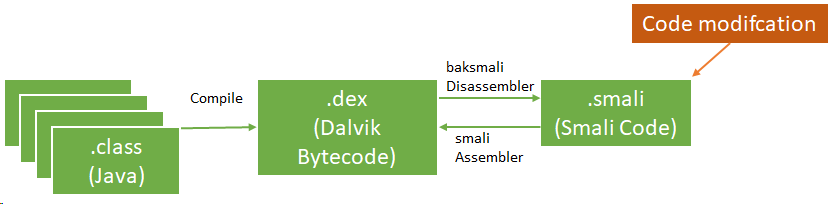
  • Smali disassembled Java opcodes in textual format generated by baksmali, a DEX format disassembler

  • App Manifest: XML file that provides essential app information

Basic static analysis provides a general understanding of the mobile application's structure. the apktool can help to decompile the app's resources.

$apktool d -o ./sample sample.apk

The apk could contains meta information in AndroidManifest.xml file, and other files as per below:

  • AndroidManifest.xml
  • classes.dex
  • res/
  • lib/
  • META-INF

We could update source codes on in the disassembled class files (smali).

There are few methods to update smali files.
  • Manually add/edit/remove smali code. We should learn about smali code. This URL may be useful. In this case, JD GUI and jadx-gui are useful tools.
  • You build new android app with your android java code, and disassemble the apk to extract the smali code.

After update the smali code, you could build an updated apk using apktool.

$apktool b -o sample_new.apk ./sample

Next, we could create key and sign.

$keytool -genkey -v -keystore resign.keystore -alias alias_name -keyalg RSA -keysize 2048 -validity 10000  
 $jarsigner -verbose -sigalg SHA1withRSA -digestalg SHA1 -keystore resign.keystore sample_new.apk alias_name  


If you know how to use smali language, you can modify apk much easier.


Reference:

1. OWASP MASVS - https://github.com/OWASP/owasp-masvs/releases/